

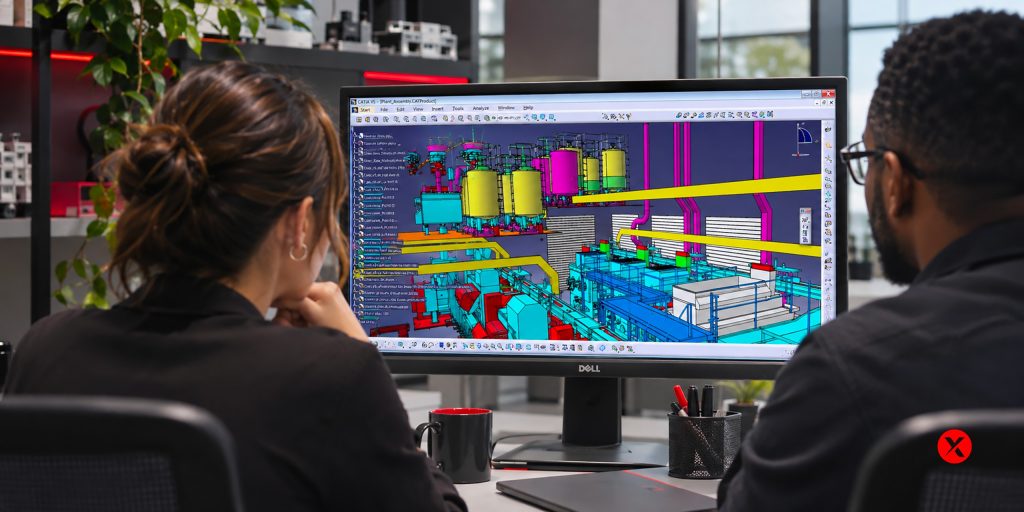
You open a machine assembly to make a small design change. The component itself is straightforward, but working around it takes longer than expected. Opening the product interrupts your morning, navigating the model feels cumbersome, and a task that should fit between meetings begins to take over the afternoon.
For engineering teams, this is where assembly performance becomes a productivity issue. The delay matters because it sits between a designer and the work they need to complete.
Understanding CATIA V5 large assembly performance starts with the relationship between the product, the task, and the engineering environment. That relationship helps explain why a performance issue deserves more context than a part count or a workstation specification can provide.
What makes an assembly demanding to work with
An assembly represents more than the components visible on screen. For the team working on it, it also contains design relationships, revision context, and information needed to make engineering decisions.
A designer modifying a bracket, a colleague reviewing its position, and someone preparing a drawing may all work with the same product. Their immediate needs differ. One needs editable geometry, another needs assembly context, and another needs a view that communicates manufacturing information.
This matters when discussing performance. Describing a product as “large” tells us something about its scale, but leaves questions about what the user is doing with it. Opening, navigating, editing, and producing drawings are distinct activities.
A useful performance discussion considers both the assembly and the work being performed. That gives the technical team a clearer picture of the designer’s experience.
How loading modes influence assembly performance
CATIA V5 provides visualization mode and design mode for different data needs.
Visualization mode uses CATIA Graphical Representation files, known as CGRs, to display component appearance. Design mode makes the original editable geometry available. Dassault’s CATIA User Community explains the distinction in its resource on visualization and design modes in CATIA V5.
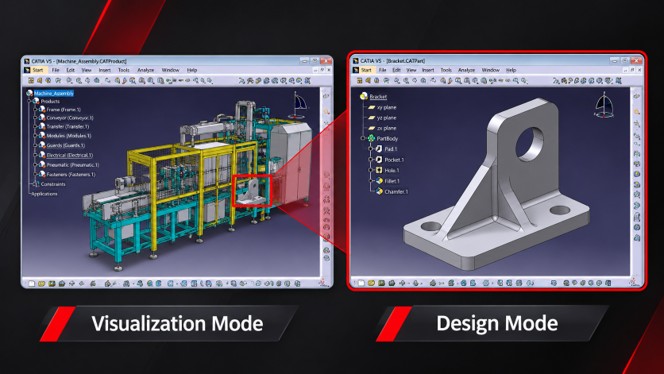
The distinction reflects a familiar engineering situation: seeing where a component belongs and changing its geometry require different information.
Imagine a bracket inside a production machine. During a design review, the surrounding assembly helps colleagues understand the bracket’s location. During a modification, the designer needs access to its editable definition. Commands used in that work may also require geometry from neighboring components.
Loading modes are therefore part of a broader workflow decision. Their suitability depends on what the engineer needs to do and which information those operations require. Understanding the principle is useful; applying it to a particular project calls for knowledge of that project’s environment.
Why the same assembly can feel different across tasks
“CATIA is slow” can describe several experiences.
For one engineer, the frustration is waiting for the product to open. For another, it is navigating after the assembly has loaded. A third may work comfortably in 3D and encounter the delay when preparing a drawing.
Those distinctions give a technical specialist important context. They help define which part of the workflow needs attention, without assuming that every delay has the same cause.
They also make the business impact easier to discuss. A delay at the start of a session is experienced differently from a pause repeated throughout the day. Both deserve attention, but they interrupt work in different ways.
For a team lead, that is a useful way to frame the conversation: which activity is becoming difficult, and how is it affecting the team’s ability to design, review, or deliver? That information connects the technical issue to the work that needs to move forward.
How much does the workstation matter
The workstation is an important part of the engineering environment. It belongs in a performance discussion alongside the software, project data, and way the team works.
Dassault Systèmes publishes certified workstation and graphics-driver information. This provides a reference for supported configurations and driver compatibility.
Compatibility and performance answer different questions. A supported configuration helps establish the environment in which the software is supported. It does not promise a particular opening time for every product or the same experience across every task.
That is why a hardware purchase should follow a clear understanding of the workload. A team considering new equipment benefits from discussing the assemblies people use, the operations they perform, and where their current experience falls short.
The desired outcome is concrete: a workstation and software environment that support the engineering work the team actually carries out.
How performance affects engineering decisions
Waiting changes the rhythm of design work. It can interrupt a comparison, break concentration during a review, or make an engineer reluctant to reopen an assembly for one more look.
For managers, these interruptions can be difficult to capture. They rarely appear as a single major stoppage. They show up between tasks, during handoffs, and in the small moments when someone is ready to act but the tools are still catching up.
A useful performance discussion connects these moments to the team’s priorities. Is the main concern a smoother design review? More predictable drawing preparation? Easier access to a product that several colleagues need throughout the day?
Defining that outcome helps keep the conversation grounded. “Faster” becomes a description of work people can complete more comfortably and consistently.
Where technical support adds value
A support conversation brings the separate parts of the environment together. The specialist can consider the CATIA software level, workstation configuration, data-management context, assembly, and affected operation as one situation.
That context matters when evaluating a change. The right approach needs to support the project’s engineering requirements as well as its performance goals.
You do not need to arrive with a diagnosis. Explaining where the wait occurs, whether it started recently, and how it affects your work gives the conversation a useful starting point. Your support contact can guide the next questions and identify what information is relevant.
Recurring delays are worth discussing while the team can still work around them. They provide an opportunity to understand the environment before the issue becomes a larger obstacle during a review or delivery deadline.
Keep large assembly work moving with Mecanica
Mecanica provides CATIA application support and advice on engineering environments. Our team can help assess a recurring performance issue in the context of your software, data, and workflow.
If opening, navigating, or working with large assemblies is getting in the way of your day, talk to Mecanica’s technical support team. Tell us what you are experiencing, and we can help determine the appropriate next step.